How to Redeem Project Soul's Codes
Find the Codes button, clear Level or Reset gates, and fix failed claims.
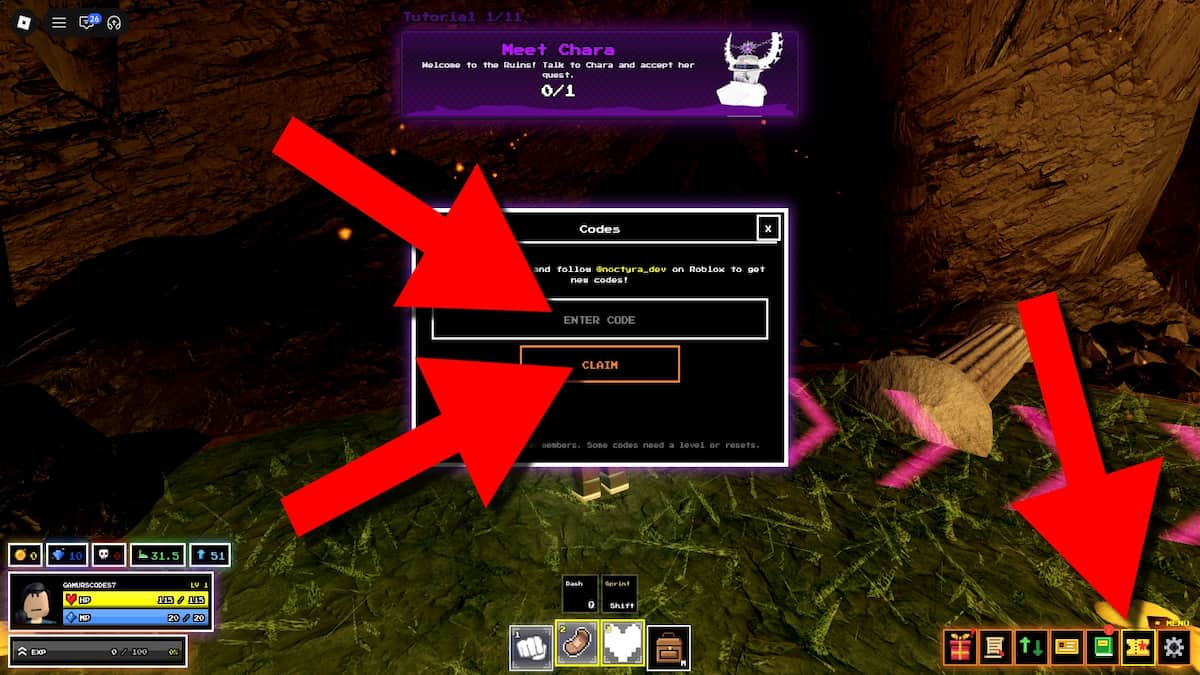
Redeeming codes in Project Soul’s [Undertale RPG] is simple once you know where the UI lives and which Level or Reset gates apply. This guide walks through the official flow, explains why claims fail, and shows how to turn Gems and Trait Rerolls into real progress instead of leaving them unspent. Pair it with the live list on the Codes Hub so you only enter strings that are still active.
Project Soul’s is an early-access Undertale-inspired open-world Action RPG by Noctyra Studios. The core loop—explore Ruins and Snowdin, fight monsters and bosses, collect Souls, master abilities, gear up, then Reset—takes hours. Codes shorten the grind, but only if you redeem them correctly on the character that meets each requirement.
Before you start
- Launch the official place: Project Soul’s on Roblox.
- Confirm you are on the Roblox account you intend to main. Codes are per account and do not move with gamepasses alone.
- Open the latest active table on Codes. Do not reuse expired strings such as
RESET,HAPPYHALLOWEEN,SORRY4SHUTDOWN,snowdinupdate,frozensans,ASRIEL, orEARLYACCESS. - Note any requirement beside the code: Level 10, Level 50, or Reset 1 are the common gates as of November 2026.
If you are brand new, skim Getting Started first so you understand Reset prestige before you chase Reset-locked rewards.
Step-by-step redemption
1. Load into a stable server
Join the experience and wait until the HUD finishes loading. After long sessions or right after a patch, UI buttons can lag. If the Codes control is missing, rejoin once before troubleshooting further.
2. Open the Codes panel
Look at the bottom-right of the screen for the Codes button. Tap or click it to open the redeem panel. This is the only supported redemption path—there is no web claim form and no Discord bot that should ask for your password.
3. Enter the code exactly
Type or paste the code. Match capitalization (SUB2NOCTYRA is not the same as a lower-case variant). Remove leading or trailing spaces. Do not add punctuation the list does not show.
4. Claim and verify
Press Claim (or the equivalent confirm control). Watch for a success toast and check your Gems and Trait Reroll counts. If nothing changes, read the on-screen error—many messages map directly to level or Reset gates.
5. Redeem the rest in priority order
A practical order for many players:
- Codes with no gate (for example
BETAwhen it is live). - Level 10 codes such as
SUB2NOCTYRAonce you clear early Ruins leveling. - Reset 1 codes (
2KCCU,GOHD) after your first prestige. - Level 50 codes (
250KVISITS) when your character is ready. OLDSOULSwhenever you own legacy gamepasses—it can stack large Gem and reroll payouts.
Always recheck the Codes Hub before a long redeem session; early-access titles rotate codes quickly after visit milestones and update launches.
Understanding requirements
Level gates
Level requirements exist so brand-new accounts cannot vacuum every social milestone reward on minute one. Level 10 is a soft onboarding gate; Level 50 expects meaningful combat and exploration time. If you are stuck under Level 50, focus on area clears, monster EXP, and boss attempts rather than hopping servers looking for a bypass—there is none.
Efficient leveling and Gem income tips live in Gems and farming. Use that guide when a Level 50 code is the only one left on your checklist.
Reset 1 gates
Reset is Project Soul’s prestige system. After you Reset at least once, Reset 1 codes unlock. Players who have not prestiged yet will see failed claims on 2KCCU and GOHD even when the codes are globally active. Do not Reset blindly just for codes—finish key Souls, abilities, and gear goals from your first cycle so the prestige is a power spike, not a soft reset of your knowledge.
If you are deciding when to prestige, combine this page with Getting Started and recent notes on Updates (Reset Update and Snowdin-related patches changed pacing for many players).
OLDSOULS and gamepass stacking
OLDSOULS is special: payout scales with older gamepass ownership and can reach roughly 2.26k Gems plus a large Trait Reroll bundle when fully eligible. Redeem it even if you only own part of the set—partial stacks still help. It does not replace meeting level gates on other codes.
Troubleshooting failed claims
“Code invalid” or no response
- Confirm the string is still listed as active on Codes.
- Check spelling and case.
- Avoid expired event codes from Halloween, Snowdin hype, Asriel teasers, or early-access launches.
“You do not meet requirements” / similar
- Compare your Level and Reset count to the table.
- Level up or complete your first Reset, then try again on the same account.
Button missing or panel blank
- Rejoin the experience.
- Disable overlapping UI from unrelated Roblox overlays if you use them.
- Try another server after a patch rollout; early-access shards update unevenly for a short window.
Rewards missing after a success message
- Reopen inventory/currency UI.
- Soft rejoin once; replication hiccups happen during busy CCU spikes (the same milestones that often produce new codes).
Someone asked you to “verify” a code on an external site
- Stop. That is a phishing pattern. Redeem only in-client. For account safety topics adjacent to exploits, see Safe Script Usage.
After you claim: spend with intent
Gems and Trait Rerolls are easy to waste.
- Trait Rerolls: Decide your build direction before rolling. Random dumping can burn a 10–25 reroll code with nothing to show. Rank desirable outcomes using the Traits tier list.
- Gems: Spend on bottlenecks—storage, key unlocks, or systems that save hours of duplicate grinding. Farm routes in Gems and farming keep you from depending on codes alone.
- Progression: Codes support the loop; they do not beat Toriel, Flowey, or secret bosses for you. Keep practicing combat and ability mastery.
Staying current
Noctyra Studios (@noctyra_dev) announces many drops on Discord and through the Roblox group. Bookmark:
- Noctyra Studios Discord
- Noctyra Studios group
- This wiki’s Updates hub for patch context
- The Codes table for copy-ready strings
When a new Reset Update or area update ships, expect both balance changes and fresh code windows. Revisit this how-to only when the UI changes; revisit the hub whenever you hear about a milestone code.
Legitimate boosts vs risky shortcuts
If redemption feels slow, the safe accelerators are codes, focused grinding, and learning bosses—not random executors promising auto-claim macros. Dedicated Project Soul’s scripts are scarce because the game is new; many “Soul” scripts online belong to other Roblox titles. Prefer the Guides Hub and official rewards over unverified automation.
Master the Codes button once, keep a checklist of gates you still need, and you will never leave a live Gem or Trait Reroll code on the table again.
Frequently Asked Questions
Quick answers for Project Soul's players.
Where is the Codes button in Project Soul's?
On the bottom-right of the in-game HUD. Open it, enter the code exactly, then press Claim. There is no official browser redeem page.
What does Reset 1 mean for codes?
You must complete at least one Reset prestige on that character before Reset 1 codes such as 2KCCU or GOHD will claim successfully.
I am Level 40—why will 250KVISITS not claim?
That code requires Level 50. Keep farming EXP and bosses, then redeem once you hit the gate. See the Gems and farming guide for efficient routes.
Can I redeem the same code twice?
Usually no. Each Roblox account claims a given code once. Alternate accounts must redeem separately and still meet requirements.
The Codes UI does nothing—what now?
Rejoin the server, confirm you are in the official Project Soul's place, and try again after patches. If the code is expired or gated, the hub table explains which issue you are hitting.